

In this guide
- Quick Picks: Converter or Full Desk Under $300
- Converter vs Standing Desk: What Each One Actually Wins On
- The Head-to-Head: Every Pick Under $300 Compared
- How We Picked
- The 4-Inch Problem: Why Converter Buyers Regret It
- Six Questions That Decide It For You
- When a Converter Is the Better Buy
- When a Converter Is the Worse Buy — Say It Plainly
- Monitor Arms: The Thing Converters Mostly Cannot Do
- The Lift Geometry Nobody Mentions: Vertical vs Arc
- Buy Neither, If…
- Should You Buy Now or Wait for a Deal?
- Frequently Asked Questions
- The Verdict
- Related guides
Part of our Desk & Ergonomics guide — how to build a home office setup in the right order.
Last updated: August 20, 2026 · Price bands checked against Amazon listings on that date.
Buy a standing desk converter if you already own a desk you like, you rent, or you expect to move within two years. Buy a full standing desk if you stand more than about two hours a day, run two monitors, or want the surface to drop below the 29″ your current desk is stuck at. Under $300 both are real options — the mistake is choosing on price, because they fail in completely different ways.
Almost every “converter vs standing desk” article online is published by a company that sells one of the two. This one compares them on what actually decides it: desk depth lost, whether your keyboard ends up too high to type at while seated, and whether a monitor arm can be attached at all.
Quick Picks: Converter or Full Desk Under $300
All price bands below are observed ranges as of August 20, 2026. Check the live price before buying.
Best converter overall — FLEXISPOT 35″ Gas-Spring Converter. A 34.6″ top tier that genuinely takes two monitors, a detachable keyboard tray, and a straight vertical lift that does not swing toward your chair. $130–$180 band (as of Aug 2026).
Check Price on Amazon
Cheapest converter worth buying — VIVO DESK-V000K 32″. The lowest-risk way to find out whether you will actually stand, with a 31.3″-wide keyboard tray and near-zero assembly. $110–$150.
Check Price on Amazon
Best converter for two monitors — VIVO DESK-V000K-M2. The only sane way to get VESA-mounted screens on a converter: the arms bolt through the platform’s own grommet rather than clamping its edge. $150–$190.
Check Price on Amazon
Buy the full desk instead — FEZIBO 48×24 Electric. Drops to 27.4″, which is lower than the fixed desk you own, and that alone fixes more posture problems than any converter can. $150–$180. More options in our best standing desk under $200 guide.
Check Price on Amazon
Converter vs Standing Desk: What Each One Actually Wins On
A converter wins on reversibility, a full desk wins on geometry. A converter adds height to a desk you keep; a full desk replaces the reference surface, so it can go down as well as up. Everything below follows from that.
| Decision factor | Converter | Full standing desk |
|---|---|---|
| Keeps the desk you own | Yes — sits on top | No — replaces it |
| Assembly | 0–10 minutes, often just a tray | 45–90 minutes, two people for the flip |
| Lowest seated keyboard height | Your desk height + 4.5″ to 4.7″ | 27.4″–28.9″ — below a standard desk |
| Desk depth consumed | 15.7″–16.3″ of your existing top | None — the whole top moves |
| Stability at standing height | Good (short lever, sits on mass) | Fair to good; wobbles more the higher it goes |
| Monitor arm mounting | Usually not rated; needs a grommet model | Yes, clamps to the desk edge |
| Cable management | Poor — cables must survive 20″ of travel | Good — tray and clips travel with the top |
| Moving house / renting | One box, no tools | Full disassembly |
| Typical spend | $110–$190 | $140–$300 |
Note the row most buyers never consider: a converter cannot lower anything. If your fixed desk is already too tall for you seated — and for anyone under roughly 5’8″ a 29″ desk usually is — a converter locks that error in and adds to it. A full sit-stand desk is the only one of the two that can fix your sitting posture.
The Head-to-Head: Every Pick Under $300 Compared
Five converters and four full desks. The Vari is listed deliberately even though it sits above the $300 frame — it is the one converter whose “no assembly at all” claim is literally true, and some people want exactly that.
| Model | Type | Best for | Height / lift range | Capacity | Width | Price band | Buy |
|---|---|---|---|---|---|---|---|
| FLEXISPOT 35″ Gas-Spring | Converter | Best converter overall | 4.7″–19.7″ of lift | 33 lb top / 4.4 lb tray | 35″ | $130–$180 | Check Price |
| VIVO DESK-V000K 32″ | Converter | Tightest budget | 4.5″–20″ of lift | 33 lb lift assist | 32″ | $110–$150 | Check Price |
| VIVO DESK-V000K-M2 | Converter + VESA arms | Two mounted monitors | 4.5″–20″ of lift | 17.6 lb per screen | 32″ | $150–$190 | Check Price |
| FEZIBO 32″ Converter | Converter | Shallow desks, white finish | 4.5″–20.1″ of lift | ~37 lb listed | 32″ | $110–$150 | Check Price |
| Vari VariDesk Pro Plus 36 | Converter (over budget) | Zero assembly, arrives ready | 11 preset heights | 35 lb listed | 36″ | $350–$400 | Check Price |
| FEZIBO 48×24 Electric | Full desk | Best value replacement | 27.4″–46.1″ | 176 lb | 48″ | $150–$180 | Check Price |
| FLEXISPOT EN1 48×24 | Full desk | Least wobble | 28.9″–46.5″ | 154–176 lb | 48″ | $170–$210 | Check Price |
| SHW 48″ Electric | Full desk | Cheapest motorised desk | 28″–45″ | 100–110 lb | 48″ | $140–$170 | Check Price |
| FEZIBO 55×24 Dual-Motor | Full desk | The $250–$300 stretch | Dual-motor, wider top | Higher rated load | 55″ | $250–$300 | Check Price |
Scroll the table sideways to see every column.
How We Picked
We compared nine sit-stand options against published manufacturer specifications, published ergonomics guidance, verified-buyer reports and current retail pricing on amazon.com. We do not claim hands-on testing of these desks — every dimension below is either a published figure or arithmetic you can repeat with a tape measure.
Three filters removed most of the market. Every product had to be currently sold on amazon.com, which eliminated a lot of models still recommended by 2023-era guides. The lift mechanism had to be stated — gas-spring, pneumatic, X-lift or motorised — because converters that publish no mechanism are usually the friction-clamp kind that sag. And height had to be published as a range, not a marketing adjective: a converter advertising “ergonomic height” without a number is hiding a minimum lift you will not like. One over-budget product is included on purpose, because under $300 no converter arrives fully assembled.
The 4-Inch Problem: Why Converter Buyers Regret It
Every converter here raises your keyboard by at least 4.5 inches even at its lowest setting. On a standard 29″ desk that puts the keyboard at roughly 33.5″ while you are sitting — four to six inches above where published ergonomics guidance puts a seated keyboard for most adults. Held for six hours a day, that mismatch is the single most common converter regret, and almost nobody mentions it before you buy.
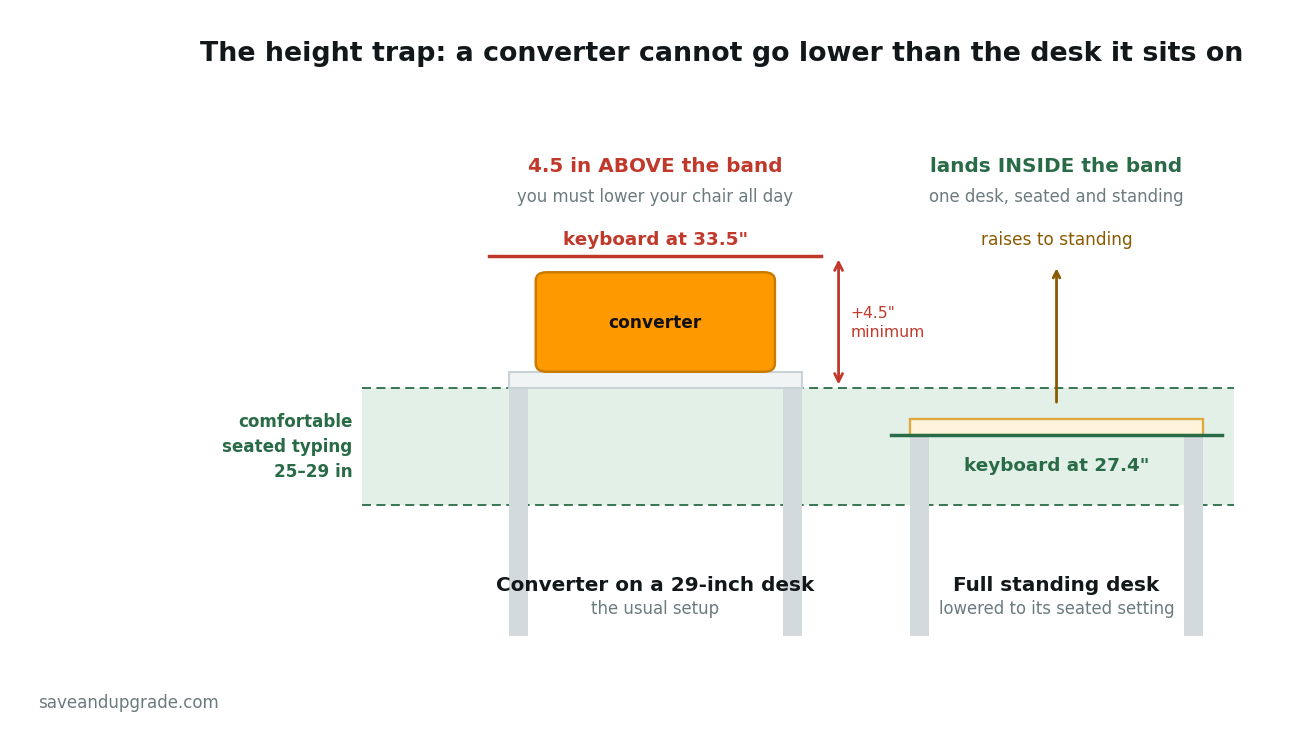
Here is the arithmetic. Fixed desks are built to a 28″–30″ convention, most commonly 29″, a height inherited from writing desks. Seated keyboard height should sit at or just below your seated elbow height with feet flat — for adults between roughly 5’2″ and 6’2″ that lands in the 25″–29″ range. A 29″ desk is already at the top of that window before you add anything. Now add the converter. Published minimum lifts:
- VIVO DESK-V000K: 4.5″ minimum
- FEZIBO 32″: 4.5″ minimum
- FLEXISPOT 35″: 4.7″ minimum
29″ + 4.5″ = 33.5″. Typing comfortably there needs your seated elbow at 33.5″, which means raising the chair by roughly five inches. Most task chairs top out around 20″–21″ of seat height, and at that setting your feet leave the floor and you need a footrest. You have paid for a converter in order to make your chair wrong.
The three honest ways out
1. Slide the keyboard off the tray when you sit. This is what most converter owners quietly settle into: keyboard and mouse live on the desk while seated, then get lifted onto the tray to stand. It works, it costs nothing, and it means you bought a two-tier device to use one tier. Models with a detachable tray — the FLEXISPOT 35″ is one — make this far less annoying.
2. Accept that you are a stander who occasionally sits. If you genuinely stand most of the day, the seated compromise matters less — set the converter for standing and treat sitting as the break.
3. Buy the full desk. The FEZIBO 48×24 drops to 27.4″ and the SHW 48″ to 28″ — both lower than the desk you own. This is the argument converter marketing will never make, and for shorter users it is decisive.
Same trap, worse version: single-tier risers — flat platforms with no keyboard tray — are worse, not simpler. The keyboard goes on the top surface, so the minimum height is the whole platform, typically 5″–6″. One deck and no tray means a monitor riser being sold as a standing desk.
Six Questions That Decide It For You
Work through these in order. The first hard “no” makes the decision and you can stop.
1. Do you own a desk you actually like?
If yes — solid wood, family furniture, a built-in run of worktop, a corner unit that fits a room nothing else fits — buy the converter. This is the strongest case for one and it is not close: swapping a desk you like for a budget laminate top is a downgrade in everything except height adjustment. If the honest answer is “it came with the apartment”, you are not keeping anything worth keeping. Buy the desk.
2. Do you rent, and how long is the lease?
A converter is a possession; a desk is furniture. If you expect to move within about two years, a converter travels in one box you can carry alone, while a 48″ desk means an hour of disassembly, a lost bolt and a second person. Renters on short leases should default to the converter.
3. Are you allowed to drill anything?
This decides monitor mounting more than it decides desks. Grommet-mounted arms need a hole through the desk top — fine on a desk you own, not fine on a landlord’s table. If you cannot drill and cannot clamp, the VIVO DESK-V000K-M2 brings its own pre-drilled grommet and is the path of least resistance.
4. How deep is your desk?
Measure front edge to wall. Converters occupy 15.7″–16.3″ of depth, so a 24″ desk is left with about 8″ of clear surface behind the front edge — enough for nothing. A 30″ desk is comfortable. The converter also has to be narrower than the desk: a 35″ converter on a 40″ desk costs you the corners you used for a notebook and a mug. Below about 22″ of depth, skip converters entirely — the screen ends up too close to your face at standing height and there is no way to push it back.
5. What is on the desk, and how heavy is it?
Converter top tiers are rated 33–37 lb, the keyboard tray often only 4.4 lb. A 27″ monitor runs roughly 10–15 lb with its stand, so two of them plus a laptop is already at or past the rating. Full desks in this range are rated 100–176 lb and the question disappears. Our guide to home office monitors under $300 lists panel weights — check those against the 33 lb ceiling.
6. Will you actually stand?
Be honest. The 2015 British Journal of Sports Medicine expert statement on sedentary office work recommends working up to about 2 hours a day of standing and light activity, eventually toward 4. Below two hours, a converter is plenty and a full desk is overspending. Above two hours, the converter’s compromises — fixed screen distance, the 33 lb ceiling, a lift cycle you perform by hand — bite every single day, and a motorised desk with memory presets is the better buy.
When a Converter Is the Better Buy
Converters win when the desk is not the problem. If your surface is the right depth and width and in a spot you like, adding height is cheaper, faster and completely reversible — it lifts off and the room goes back to how it was. Where a converter is the correct answer rather than the compromise:
- You are testing the idea. Plenty of people stand for two weeks and then never again, and a converter is a much cheaper way to find that out.
- The desk is built in. Worktops, alcove desks and anything attached to the wall cannot be replaced without a contractor.
- You share the desk with someone of a different height, and only one of you needs to change.
- You move a lot, or work in more than one spot. A converter can be carried to a kitchen counter. A desk cannot.
- You cannot assemble furniture. The Vari Pro Plus 36 lifts out of the box ready to use; the trade is that it is priced above $300.
When a Converter Is the Worse Buy — Say It Plainly
If you will stand more than about two hours a day, a converter is the worse purchase at the same money. Not slightly worse — worse in four ways that compound over a working week. The honest advice is to skip it and buy the desk.
Screen distance is fixed by the platform, not by you. The monitor sits at the back of a 16″-deep top tier, so your viewing distance is whatever the platform allows. Standing usually wants the screen slightly further away than sitting does, and a converter cannot give you that.
The lift is manual and you will feel it. Gas-spring converters need you to squeeze two levers and push a loaded platform through 20″ of travel. Four transitions a day is twenty a week. A motorised desk with presets is one button, and the difference in how often people actually change position is not small.
Cables have to survive the travel. Every cable running to the converter needs 20″ of slack, must not snag and must not pull the monitor when the platform drops. On a full desk the whole surface moves together. This is the failure that shows up three months in, after a display cable has been flexed 400 times.
You lose the desk underneath. On a 48″×24″ desk a 35″ converter takes roughly a third of the usable area and all of the depth behind the front edge, permanently.
Converters are also the wrong shape for anyone over about 6’1″: the screen rises by the same 20″ the keyboard does, and taller users need the monitor higher relative to the keyboard, not just higher overall.
Monitor Arms: The Thing Converters Mostly Cannot Do
Do not clamp a monitor arm to a converter’s platform. It is a free-floating deck already carrying most of its rated 33 lb, and a clamped arm applies a lever load its edge was never rated for. Makers generally publish no clamp rating for these decks, and “not published” here means “not designed for it”. Three workable paths, in order of preference:
- A converter with a built-in VESA mount. The VIVO DESK-V000K-M2 mounts two 13″–30″ screens up to 17.6 lb each through the platform’s own grommet, so the load path runs through structure designed for it. This is the right answer for a converter buyer with two monitors.
- Arm on the desk, converter for the keyboard only. The flaw: raise the converter and the keyboard goes up 20″ while the screen does not move, so you look down while standing. Only viable if the arm’s vertical range covers both positions, which most cheap arms do not — check the range figures in our monitor arms under $50 guide first.
- Buy the full desk. An arm clamped to a sit-stand desk moves with the surface, so the screen-to-keyboard relationship stays correct at every height. It is the main reason serious dual-monitor users end up on a full desk regardless of what they intended to spend.
The Lift Geometry Nobody Mentions: Vertical vs Arc
Converters lift in one of two ways, and it changes how much room you need in front of the desk. A straight vertical (Z-lift or scissor) mechanism raises the platform along a vertical path. An arc or parallelogram mechanism swings it up and toward you, travelling several inches into the space your chair occupies.
The VIVO K-series and the FLEXISPOT M7-style converters here are vertical-lift: pushed to the back of the desk, they stay at the back at full height. Spring-arm designs, the Vari included, move forward as they rise — which is why their listings specify a minimum desk depth, 26.5″ in the Vari’s case.
So in a cubicle, alcove or against-the-wall setup, vertical lift is the only one that works — same if your chair cannot roll back freely. Arc lift is fine in an open room and often smoother, but measure the clearance in front of the desk before delivery, not after.
Buy Neither, If…
If you have never stood at a desk for a full day, buy an anti-fatigue mat first and nothing else. It costs a fraction of either option, it tells you within a week whether standing suits you, and it is the accessory both converter and desk owners end up buying anyway. Standing on a hard floor for three hours is genuinely unpleasant — a large share of abandoned standing desks were abandoned for that reason, not because of the desk.
The ComfiLife anti-fatigue mat is the standard recommendation: 3/4″ thick foam, 20″×32″, $35–$50 band (as of Aug 2026). Stand on it at a kitchen counter for a week. If you are still standing after that, spend the real money.
Two more “buy neither” cases:
- You already decided you want a desk. Stop reading comparisons and go to our best standing desk under $200 guide, which compares six complete desks on wobble, height range and assembly reality.
- Your problem is the chair, not the height. Back pain from a bad chair does not improve because you stand for 40 minutes. Fix the chair first; a sit-stand setup is a movement tool, not a treatment.
Should You Buy Now or Wait for a Deal?
Buy now if you need it now; the discount calendar on desks and converters is shallow and predictable. These are commodity metal-and-laminate products from brands that discount continuously rather than dramatically, so the gap between a random Tuesday and the best day of the year is usually 15–25%, not 50%.
The two events that reliably move this category are Amazon Prime Big Deal Days, 7–8 October 2026, and Black Friday / Cyber Monday, 27 and 30 November 2026. Both are stronger on full desks than converters: desks are higher-ticket traffic drivers, while FlexiSpot, VIVO and FEZIBO discount converters on their own schedule all quarter. A converter you want in September is not worth holding until November.
What does not move these prices: back-to-school, which targets laptops and dorm furniture, and January “new year” sales, which on desks are usually the November price with a new banner. Within four weeks of an event, set a price alert. More than four weeks out, buy it and start standing.
Frequently Asked Questions
Is a standing desk converter as good as a standing desk?
No, and it is not trying to be. A converter is better at one thing: adding height to a desk you keep, with no assembly and no commitment. A full standing desk is better at everything structural — it goes lower as well as higher, carries 100–176 lb instead of 33 lb, takes a monitor arm and does not consume 16″ of your existing surface. Under two hours of standing a day, with a desk you like, the converter is genuinely the right buy. Above that, the desk wins.
Do standing desk converters ruin your seated posture?
They can, and this is the most common regret. Every converter here has a minimum lift of 4.5″–4.7″, so on a standard 29″ desk the keyboard tray sits near 33.5″ even at its lowest setting — several inches above where published ergonomics guidance puts a seated keyboard for most adults. The practical fix is to keep the keyboard on the desk while seated and lift it onto the tray only to stand, which is why a detachable tray is worth paying for.
What size desk do I need for a standing desk converter?
Wider than the converter and at least 24″ deep. Converters occupy 15.7″–16.3″ of depth, so a 24″ desk leaves roughly 8″ of clear surface and a 30″ desk is comfortable. A 32″ converter wants a 40″+ desk and a 35″ converter wants 44″+. Spring-arm converters that swing forward as they rise also need clearance in front of the desk — the Vari specifies a 26.5″-deep desk for that reason.
Can you put a monitor arm on a standing desk converter?
Only on models designed for it. Clamping an arm to a converter’s platform edge applies a lever load the deck is not rated for, and most makers publish no clamp rating at all. The reliable options are a converter with a built-in grommet-mounted VESA arm such as the VIVO DESK-V000K-M2, or clamping the arm to your actual desk and accepting that the screen will not rise with the keyboard. If mounted monitors are the point of the exercise, buy a full desk.
Is a standing desk converter worth it if I rent?
Usually yes. A converter needs no drilling, packs into one box and moves in a single trip, while a 48″ sit-stand desk means disassembly, a second person and somewhere for the old desk to go. If your lease has more than two years to run and you own the desk you would be replacing, the calculation flips back toward a full desk.
Are cheap standing desk converters under $150 any good?
The $110–$150 band is where the sensible converters live, so yes. The gas-spring and pneumatic mechanisms in the VIVO and FEZIBO models at that price are the same class used higher up the range; more money buys width, a monitor mount and no assembly. What to avoid at any price is a single-deck riser with no keyboard tray sold as a “standing desk” — that is a monitor riser, and it puts your keyboard even higher.
The Verdict
Buy the converter if you are keeping your desk; buy the desk if you are keeping the habit. The FLEXISPOT 35″ is the converter to get if you have the desk width for it, the VIVO DESK-V000K is the low-risk way to find out whether you will stand at all, and the VIVO DESK-V000K-M2 is the pick if two mounted monitors are non-negotiable.
But be honest about question six. If you will stand three or four hours a day, the converter’s 33 lb ceiling, fixed screen distance and manual lift will annoy you daily, and the FEZIBO 48×24 at similar money does the job properly — including going lower than the desk you already own. Our standing desk under $200 guide covers that side in full. And if you have never stood a full working day: buy the mat, try it for a week, then come back and spend the rest.
Related guides
- Best Standing Desk Under $200: 6 Picks Compared
- Best Monitor Arms Under $50
- Best Monitors for a Home Office Under $300
- Best Monitor Light Bar Under $50
Keep reading

As an Amazon Associate, Save & Upgrade earns from qualifying purchases. Prices and availability are accurate as of the date noted and are subject to change.