

In this guide
- Quick Picks
- Comparison table: all 7 keyboards
- “80% keyboard” and “$80 keyboard” are two different questions
- How we picked
- The 7 best gaming keyboards under $80
- Switch types: linear vs tactile vs clicky
- Form factors: full-size, TKL/80%, 75%, 65% and 60%
- Hot-swappable vs soldered: why it matters most at this price
- What to skip under $80
- Should you buy now or wait for a sale?
- Finishing the setup
- Frequently asked questions
- The bottom line
- Related guides
Part of our Gaming setup guides — the upgrade order that actually helps.
As an Amazon Associate, I earn from qualifying purchases.
Two different shoppers land on this page, so let’s split them apart immediately. If you want a gaming keyboard under $80, that budget now buys gasket mounts, hot-swappable sockets and pre-lubed switches — features that cost $150 two years ago. If you want an 80% keyboard, you are asking about a layout, not a price: 80% means an 87-key tenkeyless board with the number pad removed. This guide covers both, and the best board here happens to be both at once.
Seven boards below, all verified as currently sold on Amazon in August 2026, with switch type, exact layout and hot-swap status stated for each — because those three specs decide whether you end up liking a keyboard, and almost nobody puts them in one table.
Quick Picks
Best overall & best true 80% — Keychron C3 Pro TKL (8K). A real 87-key 80%/TKL with gasket mount, hot-swap sockets, PBT keycaps and QMK/VIA. Wired only.
Check Price on Amazon
Best wireless & quietest — EPOMAKER x Aula F75. 75%, Bluetooth + 2.4GHz + USB-C, gasket mount, five layers of internal foam, pre-lubed linears. The shared-room pick.
Check Price on Amazon
Best wireless 80% — Attack Shark M87 (hot-swap gasket version). The only board here that is both a true 87-key TKL and tri-mode wireless. Read the model warning below first.
Check Price on Amazon
Best cheap board — Redragon K617 Fizz. A 60% with hot-swap sockets and linear reds for roughly the price of two pizzas. The entry point, not the destination.
Check Price on Amazon
Comparison table: all 7 keyboards
Every row links to the current listing. Price bands describe typical street pricing observed in early August 2026 and change constantly — check the live listing.
| Keyboard | Switch type | Form factor | Hot-swap | Backlight | Connection | Price band | Buy |
|---|---|---|---|---|---|---|---|
| Keychron C3 Pro TKL (8K) | Tactile (Super Brown) | 80% / TKL, 87 keys | Yes | RGB, shine-through PBT | Wired USB-C | Upper $40s–$60s | Check price → |
| EPOMAKER x Aula F75 | Linear (LEOBOG Reaper, pre-lubed) | 75%, 81 keys + knob | Yes | RGB | BT 5.0 / 2.4GHz / USB-C | $40s–$60s | Check price → |
| Attack Shark M87 RGB | Linear (White Jade) | 80% / TKL, 87 keys | Yes | RGB | BT / 2.4GHz / wired | $40s–$70s | Check price → |
| Keychron C3 Pro (1000 Hz) | Tactile (K Pro Brown) | 80% / TKL, 87 keys | Yes | RGB | Wired USB-C | Mid $30s–$50 | Check price → |
| AULA F75 Pro | Linear (Reaper, pre-lubed) | 75%, 81 keys + knob | Yes | RGB | BT 5.0 / 2.4GHz / USB-C | $40s–$60s | Check price → |
| RK Royal Kludge RK61 | Linear (Red) | 60%, 61 keys | Yes | RGB | Wired USB-C | $30s–$50 | Check price → |
| Redragon K617 Fizz | Linear (Red) | 60%, 61 keys | Yes | RGB, 20 onboard modes | Wired USB-C | Upper $20s–$40 | Check price → |
“80% keyboard” and “$80 keyboard” are two different questions
An 80% keyboard is a layout: 87 keys, number pad deleted, function row and arrow keys and navigation cluster all kept, with visible gaps between the three blocks. It is the same thing as TKL, or tenkeyless. An $80 keyboard is a budget. The two get confused constantly because many of the best 80% boards sell for well under $80.
The distinction matters when you shop, because sellers stretch the term. Plenty of listings marketed as “80%” are really 75% boards with 81 to 84 keys, where the navigation keys are squeezed into a right-hand column and the gaps are gone. Neither is worse, but you should know which is arriving. The quick check: count the keys in the product photo. 104 is full-size, 87 with three visible blocks is 80%/TKL, 81–84 with no gaps is 75%, 68 is 65%, 61 is 60%. On this list the Keychron C3 Pro and Attack Shark M87 are true 87-key 80% boards; the Aula F75 and F75 Pro are 75%; the RK61 and K617 are 60%.
How we picked
We compared current models against published lab measurements, teardown coverage from keyboard-focused reviewers, verified-buyer reports and live retail listings. Every product linked here was checked in August 2026 and resolves to something still on sale — worth stating, because a large share of budget keyboard roundups still link to boards delisted years ago.
Three filters removed most of the market: the board has to be genuinely mechanical rather than a membrane board marketed with mechanical language; it has to use standard MX-compatible switches; and it has to have hot-swap sockets, because at this price hot-swap costs nothing and its absence removes your only cheap upgrade path.
The 7 best gaming keyboards under $80
1. Keychron C3 Pro TKL (8K) — best overall, and the best true 80%
- Best overall, and the best true 80%
- Tactile (Super Brown)
- 80% / TKL, 87 keys
- RGB, shine-through PBT
- Upper $40s–$60s
Buy this if you want one recommendation and no further thought. It is a true 87-key 80%/TKL on a gasket-mounted case, with hot-swappable sockets, shine-through PBT keycaps and QMK/VIA programmability through Keychron’s Launcher web app. The 8K version adds switchable polling — 1000, 4000 or 8000 Hz — plus extra case foam over the older model.
The gasket mount is what you notice daily. The plate sits on compressible gaskets rather than being screwed rigidly to the case, so bottoming out has give instead of a hard stop into plastic — with the foam, that is the difference between the hollow ping of a $25 board and something muted and solid. The Super Brown switches are tactile, suiting mixed gaming and typing; if you want linears for FPS, the sockets mean a $20 switch set converts the board in fifteen minutes. The trade-off is that it is wired only.
2. EPOMAKER x Aula F75 — best wireless, best sound
- Best wireless, best sound
- Linear (LEOBOG Reaper, pre-lubed)
- 75%, 81 keys
- RGB
- $40s–$60s
Buy the F75 if the keyboard lives in a room with other people in it. It is a 75% tri-mode board — Bluetooth 5.0, 2.4GHz dongle, USB-C — on a gasket structure with five layers of internal damping: two layers of Poron foam, an IXPE switch pad, a PET sound-enhancement pad and a bottom silicone pad. A 4,000 mAh battery drives the wireless side. The result is a low, dull thock instead of the sharp clack most budget boards make.
It ships with LEOBOG Reaper switches, linear and pre-lubed from the factory. Pre-lubing matters more than people expect: an unlubed budget linear has a faint scratchiness on every press that you cannot un-notice once you have used a lubed board. The stabilisers are decent out of the box too — normally the first thing to rattle on a cheap board. Layout caveat: this is a 75%, not an 80%.
3. Attack Shark M87 (RGB hot-swap version) — best wireless 80%
- Best wireless 80%
- Linear (White Jade)
- 80% / TKL, 87 keys
- RGB
- $40s–$70s
The only board here that is both a true 87-key 80%/TKL and tri-mode wireless under $80. Gasket mount, hot-swappable sockets, linear switches, five-layer sound damping and a 4,600 mAh battery — large enough that most people charge it monthly rather than weekly.
Read this before you buy. “Attack Shark M87” is sold as two completely different keyboards under one model name. One is the hot-swap gasket-mount mechanical board described here. The other is a cheaper membrane board whose listing says “mechanical feeling” in the title and “PC Membrane Keyboards” further down. They look alike in thumbnails and both say “80% TKL”. The mechanical one lists hot-swappable, gasket mount and a switch type; the membrane one does not. Check the bullets, not the title.
4. Keychron C3 Pro (1000 Hz) — the cheaper 80% that gives up almost nothing
- Cheaper 80%, gives up almost nothing
- Tactile (K Pro Brown)
- 80% / TKL, 87 keys
- RGB
- Mid $30s–$50
The original C3 Pro is the same 87-key gasket-mount TKL chassis, with hot-swap sockets, RGB and QMK/VIA across Mac, Windows and Linux, but with 1000 Hz polling and ABS keycaps instead of PBT. It typically sells for meaningfully less.
Be honest about what 8000 Hz polling buys you. At 1000 Hz your keystrokes are already sampled a thousand times a second; the latency gain from 8K is a fraction of a millisecond, below human perception, and it costs more CPU overhead. Take the 1000 Hz version and spend the difference on a switch set or better keycaps — both of which you will notice.
5. AULA F75 Pro — best for multi-device switching
- Best for multi-device switching
- Linear (Reaper, pre-lubed)
- 75% + knob
- RGB
- $40s–$60s
Buy the F75 Pro if the keyboard has to serve more than one machine. It pairs with up to five devices across Bluetooth 5.0, 2.4GHz and USB-C, and switches between them from the board itself — so a work laptop, a desktop and a tablet can share one keyboard without re-pairing anything each time.
It is otherwise close to the F75 above: an 81-key 75% layout, hot-swap sockets taking 3- or 5-pin switches, pre-lubed Reaper linears, RGB and a control knob. The spec that genuinely separates them is the keycaps. The F75 Pro uses side-printed PBT, where the legends sit on the front face of the keycap rather than the top, so they never wear through under your fingertips — the failure mode that eventually kills cheap ABS caps. To be clear, both boards have a knob; that is not the reason to choose this one.
6. RK Royal Kludge RK61 — best 60%
- Best 60%
- Linear (Red)
- 60%, 61 keys
- RGB
- $30s–$50
The RK61 is the 60% to buy if you want QMK/VIA on a compact board: 61 keys, wired USB-C, hot-swappable, RGB, linear red switches. QMK/VIA is the differentiator, because on a 60% board your Fn layer is the keyboard — remapping the whole layer instead of accepting the factory one is the difference between a 60% you tolerate and one you like.
Note this version is wired only. Royal Kludge also sells wireless RK61 variants and the two are easy to confuse in search results, so check the connectivity bullet before ordering.
7. Redragon K617 Fizz — cheapest board worth owning
- Cheapest board worth owning
- Linear (Red)
- 60%, 61 keys
- RGB, 20 onboard modes
- Upper $20s–$40
The floor of this category: a 61-key 60% with hot-swap sockets, linear reds and 20 onboard RGB modes, usually for less than half the budget. It will not sound like the F75 — thin case, no real damping, unlubed stock switches — but it is a genuine mechanical keyboard with genuine sockets, which puts it ahead of every membrane board at the price.
Treat it as a platform, not a finished product. A $15 set of lubed linears and a $10 sheet of foam transform it, and that path exists only because of the sockets. If this is your first mechanical keyboard and you do not yet know which switch you like, it is the cheapest honest way to find out.
Switch types: linear vs tactile vs clicky
Pick linear for competitive gaming, tactile for mixed gaming and typing, clicky only if you game alone. That is the whole decision, and it matters more to how a keyboard feels than the brand, the RGB or the polling rate.
Linear switches — Red, Speed Silver, LEOBOG Reaper, Gateron Yellow — travel smoothly top to bottom with no bump and no click. Nothing interrupts the stroke, so rapid repeated presses feel consistent, which is why movement-heavy FPS players almost universally use them. The cost is typing: with no feedback telling you the key registered, you either bottom out every key or make more typos until muscle memory catches up. Most actuate around 45 g.
Tactile switches — Brown, Keychron Super Brown, Boba U4T — add a bump right around the actuation point. You feel the key register without hearing it. If you game and also write emails, code or documents on the same board, tactile is the safer default. The bump does not measurably slow you down in games; the idea that tactiles cost you frames does not survive contact with latency measurements.
Clicky switches — Blue, Green, Outemu Blue — add the bump plus a click bar that snaps audibly. Genuinely satisfying to type on, genuinely antisocial. The click carries across a room, and on voice comms it gets picked up by any microphone that is not aggressively noise-gated.
For a shared room, the ranking is: pre-lubed linears in a foam-damped gasket case (the Aula F75), then stock linears, then tactiles, then clicky last by a wide margin. Adding foam and lubed switches to a cheap board does more for noise than buying a “silent” branded board.
Form factors: full-size, TKL/80%, 75%, 65% and 60%
Choose 80%/TKL unless you have a specific reason not to. It gives you the mouse room that matters for gaming without deleting any key you use, which is why it is the default competitive layout. Here is what each step down actually costs.
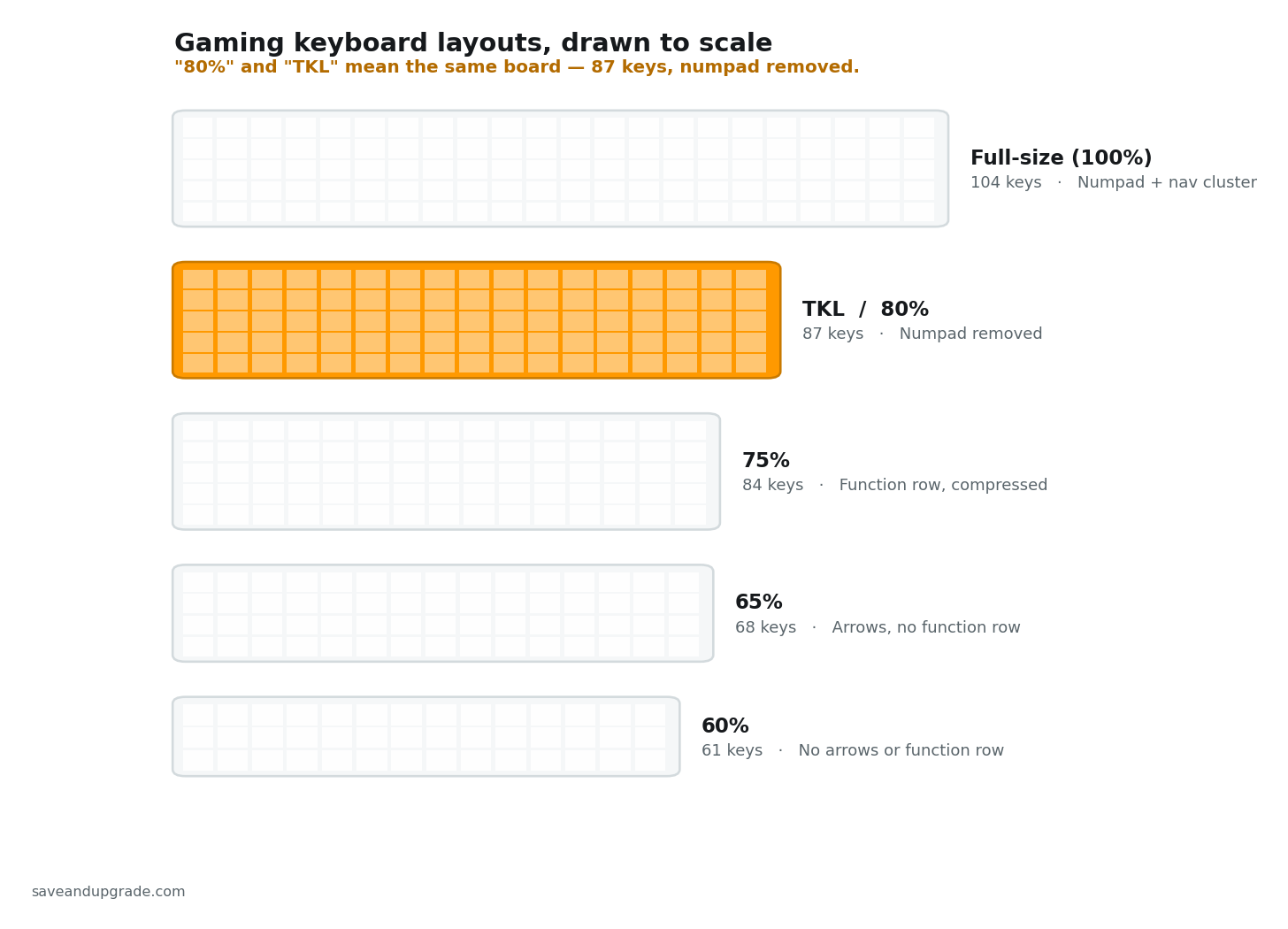
Full-size (104 keys) keeps everything including the number pad. Worth it only for real data entry, accounting or CAD. For gaming it is actively worse: the numpad pushes your mouse roughly four inches right, forcing a higher sensitivity or a cramped grip.
80% / TKL (87 keys) deletes only the number pad. You keep the function row, real arrow keys and a separate Insert/Home/Page Up cluster with gaps between blocks. You lose nothing you use in a game and get the desk width back. This is the sweet spot, and the reason “80% keyboard” is a query at all.
75% (81–84 keys) compresses the same key count tighter: navigation keys become a right-hand column and the gaps disappear. You save another inch of width, at the cost of arrow keys sitting flush against right Shift — mis-presses are common for a week.
65% (68 keys) drops the function row but keeps arrow keys. F1–F12 move to a Fn layer. Fine for gaming, irritating if you use F-key shortcuts.
60% (61 keys) drops the function row, arrow keys and navigation cluster onto a Fn layer you have to memorise. The upside is real — maximum mouse room, fits in a backpack. The downside is that every Alt+F4 and every arrow-key text edit becomes a two-handed chord. Buy it for a dedicated FPS station or for travel, not as your only keyboard.
Hot-swappable vs soldered: why it matters most at this price
Hot-swap sockets are the single most valuable feature under $80, and it is not close. On a soldered board each switch is permanently fixed to the PCB; changing one means a soldering iron, a desoldering pump and 87 joints. On a hot-swap board you pull the keycap, pull the switch with a $2 puller and press a new one in — the whole board takes about fifteen minutes.
Two consequences follow, both specific to the budget tier. Repair: switches fail. When a key on a soldered $60 board starts chattering — registering double presses — the board is scrap unless you can solder. On a hot-swap board you replace one switch for about a dollar. Upgrade path: the largest single improvement you can make to a budget keyboard is better switches, and a set of pre-lubed linears costs $15–25. On a hot-swap board that is an upgrade; on a soldered board it is a reason to buy a new keyboard.
That is why hot-swap was a hard filter here. It is standard at this price in 2026, so paying $60 for a soldered board is paying full price for a dead end. Check the bullets for “hot-swappable” or “hot swap socket”; if the spec sheet does not say it, assume soldered.
What to skip under $80
Three categories are worth avoiding outright, and all three are heavily marketed.
Membrane boards sold with mechanical language. The tells are “mechanical feel”, “mech-dome”, “mechanical-feeling”, “tactile membrane” and “mechanical-style switches” — all of which mean a rubber dome under the key. Logitech’s G213 uses Mech-Dome keys; SteelSeries’ Apex 3 line uses membrane switches engineered to mimic mechanical actuation. Both are competently built and both are membrane. At $50–80 you are paying mechanical money for a domed sheet that cannot be repaired, cannot be modified and wears out as a unit.
Proprietary switch stems. Some manufacturers use non-standard stems or mounting — Logitech’s Romer-G and GX-family boards, Razer’s low-profile budget boards, various no-name opticals. When a switch dies you cannot buy a replacement on the open market, and standard MX keycap sets may not fit. At $150 that is a defensible trade for a specific feel; at $60 it caps the board’s lifespan at its worst switch.
Boards whose spec sheet leads with RGB. If a listing spends four bullets on lighting effects and never names a switch type, mount type or polling rate, that ordering tells you where the money went. Lighting is the cheapest thing to add to a keyboard; foam, gaskets, pre-lubed switches, PBT keycaps and decent stabilisers are the expensive things, and they are what you notice on day 400.
One honest limit: nothing under $80 gives you Hall-effect or analogue switches with adjustable actuation and rapid trigger. That technology is real, it does help in competitive FPS, and as of August 2026 it still starts above $100. If rapid trigger is your reason for upgrading, save up instead.
Should you buy now or wait for a sale?
Buy now. Budget mechanical keyboards are the worst category on a gaming desk to hold out for a calendar event, because the brands that dominate under $80 discount continuously rather than seasonally — and because a percentage that looks large on a $200 board is a handful of dollars on a $40 one. The exception is if you are buying a gift, in which case the October and November windows give you cover to order early and still get the lower of the two prices.
The 2026 calendar, and what each event actually moves
Three retail events remain in 2026: Prime Big Deal Days on 7–8 October, Black Friday on 27 November and Cyber Monday on 30 November. Prime Big Deal Days is Prime-members-only and skews toward Amazon’s own devices and toward brands paying for placement; Black Friday and Cyber Monday are open to everyone and are where third-party keyboard brands concentrate their deepest cuts of the year. Sony’s Days of Play and the summer Prime Day sit in May–June and are already behind us for this year.
What that means per brand tier is not uniform:
- Direct-from-manufacturer brands — Attack Shark, AULA, EPOMAKER, Redragon, RK Royal Kludge — run clippable Amazon coupons and limited-time promotions on a near-permanent rotation. Their event-day price is often the same promotion they were already running, relabelled. Waiting six weeks to save what a coupon would have given you today is a bad trade.
- Keychron behaves more like a Western brand: fewer, larger discount events, and it also discounts through its own store, so the Amazon listing is not always the cheapest place the board is sold. This is the one pick on the list where checking around the November window can be worth it.
- Switches and keycaps, if you plan to mod a hot-swappable board later, discount on the same rhythm as the boards. There is no reason to buy the keyboard now and the switches in November.
The trick that beats the calendar: colourways are separate listings
This is the part almost nobody mentions. On Amazon, every colour and every switch option of these keyboards is a separate ASIN with its own independent price. The AULA F75 Pro exists under half a dozen listings across white, grey, blue and gradient finishes; the Keychron C3 Pro sells under different listings for Super Brown, Super Red and Super Banana switches; the Attack Shark M87 PRO has a listing per colour. Those listings routinely sit at different prices on the same day, for the same keyboard.
So before you set a price alert, open the manufacturer’s Amazon storefront and check the sibling listings. A colour you are neutral about, available today, frequently costs less than the colour you wanted will cost on Black Friday. That is a real saving available on any random Tuesday, and it does not require you to type on a board you dislike for six weeks — only to accept a different shade of plastic.
What waiting actually costs you
If your current keyboard is a rubber-dome board or has a key that has started chattering, the honest maths runs the other way: six weeks of a keyboard that misfires during a match is a worse outcome than paying a few dollars more for one that does not. Under $80 the absolute dollar difference between the best price of the year and a normal-week price is small enough that it should not decide the purchase. Above $150 — a Hall-effect or rapid-trigger board, say — the calculation flips and waiting for November genuinely pays.
One timing note that is not about price: these brands launch and retire colourways constantly, and a specific variant can disappear from Amazon without warning. If you have decided on a particular switch and finish, availability is a stronger argument for buying now than price is.
Finishing the setup
If you are upgrading the board because the setup feels sluggish, the mouse is usually the bigger bottleneck — sensor quality and weight change your aim far more than switch type changes your typing. Our guide to the best gaming mice under $50 covers the same budget tier.
The other cheap win is lighting. RGB backlighting looks good but throws almost no usable light on your hands; a monitor light bar under $50 lights the keyboard without putting glare on the screen, which is the actual fix for late-night eye strain.
Frequently asked questions
Is an 80% keyboard the same as a TKL keyboard?
Yes. 80% and TKL (tenkeyless) describe the same layout: 87 keys, a full function row, arrow keys and a separate navigation cluster, with the number pad removed. It is roughly 80% of the width of a full-size board, which is where the name comes from. Watch for listings that label 75% boards as 80% — count the keys in the photo. 87 keys with visible gaps between the three blocks is a true 80%.
How many keys does an 80% keyboard have?
An 80% keyboard has 87 keys. It is a full-size 104-key layout with the 17-key number pad removed, which is also why the same board is called tenkeyless or TKL. Count them in the listing photo: 87 keys in three separate blocks — main cluster, navigation cluster, arrow keys — is a true 80%. An 81 to 84-key board with no gaps between blocks is a 75%.
Is $80 enough for a good gaming keyboard?
Yes, and it buys more than it did two years ago. Under $80 you can get a gasket-mounted case, hot-swappable sockets, pre-lubed switches, PBT keycaps, QMK/VIA programmability and tri-mode wireless. What you still give up is an aluminium case and Hall-effect or analogue switches with adjustable actuation, which remain a $100-plus feature.
What is the best mechanical keyboard under $80?
The Keychron C3 Pro TKL is the strongest all-round pick. It is a true 87-key 80%/TKL layout with a gasket-mounted case, hot-swappable sockets, PBT shine-through keycaps and QMK/VIA programmability — an unusually complete spec list for the money. If you need wireless instead, the EPOMAKER x Aula F75 adds Bluetooth and 2.4GHz plus five layers of internal sound damping in a 75% layout.
Are 80% keyboards good for gaming?
80%/TKL is the most popular competitive layout for a reason. Removing the number pad moves your mouse hand about four inches closer in, which lets you run a lower sensitivity and bigger arm sweeps without running out of desk. You keep the function row for binds and comms, and you keep real arrow keys, which 60% boards move to a Fn layer.
Which switch type is best for gaming?
Linear for competitive gaming, tactile for mixed gaming and typing, clicky only if you game alone. Linears have no bump, so rapid repeated presses feel more consistent. Tactiles add a bump that improves typing accuracy without measurably slowing you down in game. Clicky switches are loud enough to be picked up by a headset microphone.
Do I actually need hot-swappable switches?
At this price, yes, because it costs you nothing to have it. Hot-swap sockets let you replace a single dead switch for about a dollar instead of scrapping the board, and let you change how the keyboard feels for the price of a $15–25 switch set instead of a new keyboard. It is standard under $80 in 2026, so a soldered board here is a dead end for no saving.
Should I buy a 60% or an 80% keyboard?
Buy 80% unless desk space is genuinely the constraint. A 60% deletes the function row, arrow keys and navigation cluster onto a Fn layer you have to memorise. That is fine for a dedicated FPS setup and great for travel, but it becomes a daily irritation if you also use the board for spreadsheets, editing or F-key shortcuts. 80% gives you the same horizontal mouse room without deleting keys.
The bottom line
If you want one answer: the Keychron C3 Pro TKL. True 80% layout, gasket mounted, hot-swappable, programmable — it satisfies both the “under $80” and the “80% keyboard” version of this search at once. If you need wireless, take the EPOMAKER x Aula F75 for the quietest typing here, or the Attack Shark M87 for wireless in a true 87-key layout. On a $30 budget, the Redragon K617 Fizz is a real mechanical board with real sockets.
Whatever you pick, apply the same three checks: MX-compatible mechanical switches, hot-swap sockets, and a key count that matches the claimed layout.
Related guides
Keep reading
As an Amazon Associate, Save & Upgrade earns from qualifying purchases. Prices and availability are accurate as of the date noted and are subject to change.
Leave a Reply